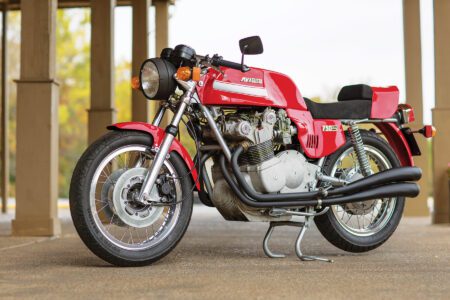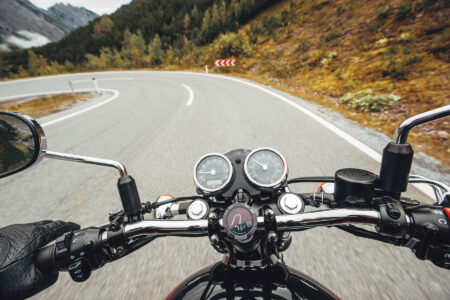
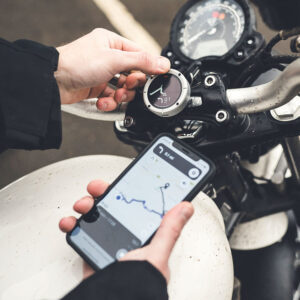
Many riders rely on a smartphone for navigation, but mounting one on the handlebars exposes it to vibration, weather, and distraction. Since July 2024, I’ve been using a different solution: the Beeline Moto II, a compact GPS navigation device that wirelessly connects to a smartphone via Bluetooth. With the phone safely tucked away in a pocket or tank bag, the Beeline provides the navigation display on the handlebars.
I’ve used the free Beeline app on my iPhone to plan local rides, as well as on several multi-day group rides where the organizers provided downloadable GPX files for each day’s route. When planning rides, you can choose options such as avoiding toll roads, ferries, highways, or unpaved roads, and select either the fastest route or a more leisurely “relaxed” option. Once a route is chosen and the Bluetooth connection established, the smartphone sends the route data to the Beeline, and you’re ready to go.
Pairing the unit with the phone and learning the controls took only a few minutes. The Beeline relies on the smartphone for route planning and GPS data, but once a route is loaded, it does not require a cellular signal to function. The only thing you’ll miss without signal is automatic re-routing if you go off your planned path.
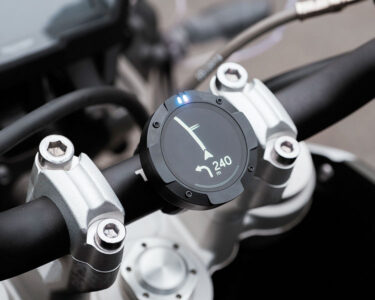
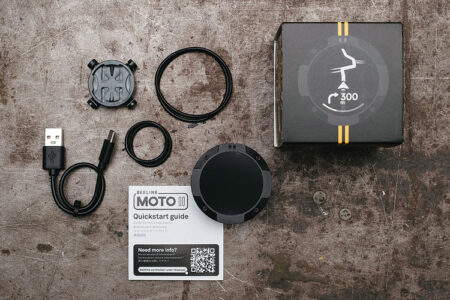
The device itself resembles a miniature hockey puck — just 2 inches (50mm) in diameter and 0.75 inch (20mm) thick — and weighs only 2.2 ounces (62g). Four buttons positioned around the perimeter at the 12, 3, 6, and 9 o’clock positions provide access to its functions. The interface is simple and quickly becomes intuitive. The unit is dustproof and waterproof (IP67), so riding in the rain isn’t a concern. The high-contrast screen proved easy to read in bright sunlight and at a quick glance, even with a dark visor.
Six optional mounting solutions are available in addition to the universal mount supplied with the device. The universal mount is particularly versatile: a simple plastic disc secured to the handlebars using a pair of included rubber bands. Two band sizes accommodate a wide range of handlebar diameters, and the setup makes it easy to transfer the unit between bikes. Optional clamp-on mounts for handlebars or mirror stalks are available for riders who prefer a more permanent installation. Beeline also offers a ball mount and a mount with an integrated charging cable.
The Moto II recharges via a standard USB-C cable (included), and in my experience, a full charge easily lasts a day’s riding. Beeline claims up to 14 hours of battery life, which aligns with what I’ve seen on the road. For particularly long rides, the unit can be connected to a power source and charged while in use. I carry a small portable charger in my tank bag in case my phone or the Beeline need a boost during the day.
Once underway, the Beeline provides clear visual turn prompts and, particularly helpful on twisty roads, an indication of how sharp upcoming corners are. It doesn’t display street names or offer spoken directions, but it does beep and flash a light as you approach a turn. The screen is deliberately uncluttered — no detailed maps or excess information — showing only what you need at a glance: distance to the next turn, direction of travel, and whether you’ve strayed off course. Those willing to pay for a Beeline Plus subscription (I didn’t) can also enjoy live traffic updates and speed camera alerts.
If you miss a turn, the device alerts you and allows you either to backtrack or continue on while the system recalculates a new route, provided your phone has a cellular connection. The unit also tracks ride statistics such as remaining time and distance, current and average speed, and battery levels for both the smartphone and the Beeline itself. The display provides useful information without becoming distracting while riding.
The device can also be used to simply record a ride. While riding in this mode, the Moto II can be toggled between screens that display distance covered, current and average speed, elapsed time and current time, battery charge for the Moto II and coupled smartphone, and compass heading. Upon completion, the ride is automatically saved within the Beeline app, and information such as route, average/maximum speed, moving/elapsed time, elevation gain/loss, and profile are all recorded as part of the “journey.” Information about the route can be viewed within the app using several different map formats (street names only, satellite view, hybrid, etc.). Journeys displayed on the phone can be expanded to see street names and other details.
Saved journeys can also be downloaded as GPX files if you want to share them with others or open them with another navigation app. The GPX format is compatible with most, if not all, GPS/satnav guidance applications. This feature is extremely handy for those leading rides who wish to share planned routes with a group. I’ve attended a few multi-day rides where the organizers shared GPX files for each day’s route, which riders can upload to their preferred navigation app. The ride leader simply needs to record each day’s ride in advance.
Riders accustomed to spoken directions or a full map display may find the Beeline’s minimalist interface takes a little getting used to, but after almost two years of use, I’ve come to appreciate the Beeline Moto II as a tidy, focused navigation tool for riders who simply want the essentials. Its minimalist display provides clear guidance without cluttering the cockpit, and it looks far less out of place on a classic motorcycle than a handlebar-mounted smartphone.
The Beeline Moto II retails for $219.99 with a plastic housing or $249.99 with a metal housing. Both versions include a 30-day money-back guarantee and can be purchased directly from the manufacturer at Beeline.co (with free shipping to the U.S.) or from the usual online vendors (RevZilla, Cycle Gear, J&P Cycles, etc.). The free Beeline app is available through Google Play and the Apple App Store, allowing potential users to explore the navigation software before purchasing the device. Additional information about the Moto II can be found on the Beeline website.